RDM is the reason a lighting console can now tell you which fixture is running hot, which one has the wrong address and which one is a firmware revision behind — without anybody climbing the truss. Here is what Remote Device Management actually does, how it fits onto a cable that used to carry data one way only, and where it breaks in real rigs.
1. What RDM Is — and What It Is Not
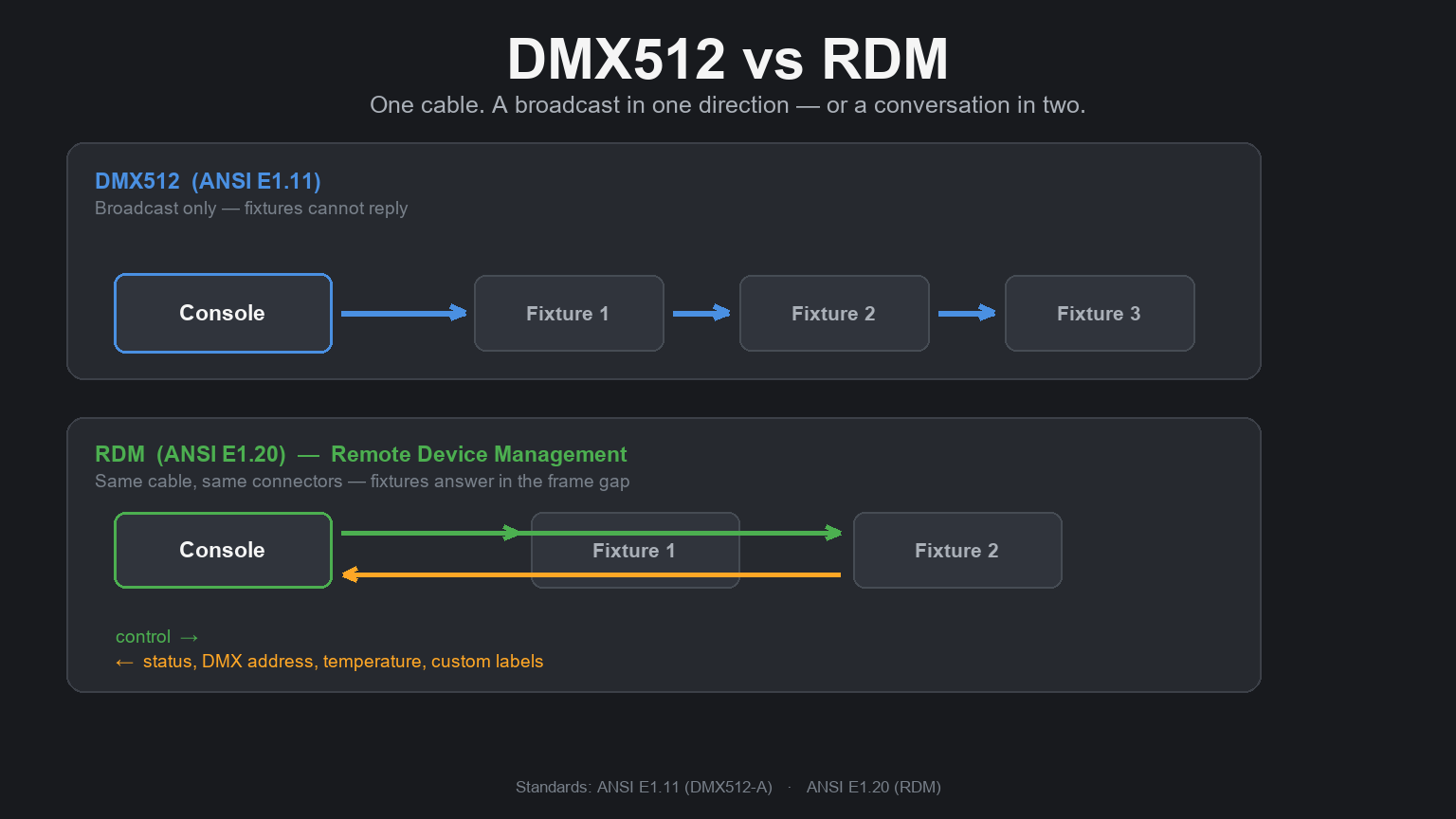
RDM stands for Remote Device Management. Its full name is ANSI E1.20 — Remote Device Management over DMX512 Networks, approved as an ANSI standard in 2010 and revised since. Put simply: it gives a lighting console the ability to ask fixtures questions, and to change settings inside them, over the same cable the console already uses to control them.
That "same cable" part is the whole point. DMX512 has always been a one-way street: the console talks, the fixtures listen. Everything else — what address a fixture is on, what firmware it runs, how hot it is, whether a fan has failed — you find out by walking to the fixture with your eyes and hands. RDM adds a return path.
It is not a replacement for DMX, and it is not a separate network you have to build. It is a small, carefully rationed amount of two-way traffic layered onto the cable you already ran.
What RDM is not:
- Not a wireless or Ethernet system. It runs on the DMX data pair. (There is a separate standard, RDMnet, that carries RDM over IP — more on that below.)
- Not a replacement for DMX. The show data still goes out as ordinary DMX512. RDM shares that line.
- Not a way to send audio, video or files. A few dozen bytes per exchange is the scale we are working at.
- Not automatic. Equipment has to support it, the splitter has to pass it, and someone has to switch it on.
2. The Problem It Solves
RDM is easier to understand as a list of things nobody wants to do at 2 a.m.:
Repatching addresses after a channel count changed. A fixture moved from the back truss to the front, or a new head was added mid-tour. Somebody has to climb to the fixture, read the three-digit display upside down, and press a menu button eleven times.
Finding the fixture that is misbehaving. One head in a row of twenty-four is not firing, or is firing on the wrong colour. Visually they look identical. Without remote identification you either guess, or you black the rig out and cycle them one at a time.
Taking physical inventory. How many of a given model are on this rig? What firmware are they running? Are any of them a different revision than the rest? The honest answer is usually "walk the rig with a clipboard."
Discovering a failure before it reaches the stage. A cooling fan that has slowed down, a fixture running 15 °C hotter than its neighbours, an output that is dimming because a driver is degrading. All of this produces data long before it produces a visible problem on stage.
Confirming that what you specified is what got installed. On a large install, "verify the delivered addresses against the drawings" is a job nobody enjoys and everybody skips.
RDM turns each of those from a physical task into a screen you look at. That is the entire value proposition, and it is worth a lot of money on a rig you cannot easily reach.
3. How RDM Shares a One-Way Cable
The trick is timing, not extra wiring.
A DMX512 signal is sent as a continuous stream of frames. Each frame begins with a break, then a mark-after-break, then a start code, then up to 512 channel slots. At 250 kbit/s and the standard 44 frames per second, one complete frame takes roughly 23 milliseconds. That frame rate is not a coincidence — it is the timing the standard defines, and it is what makes movement look smooth.
Between the end of one frame and the break of the next there is a short silence: the frame gap, typically a millisecond or two. That silence is where RDM lives. An RDM-capable fixture listens to the whole frame, recognises the RDM start code when it appears, and — if the message is addressed to it — waits for the frame to finish and transmits its answer inside the gap, before the next frame begins.
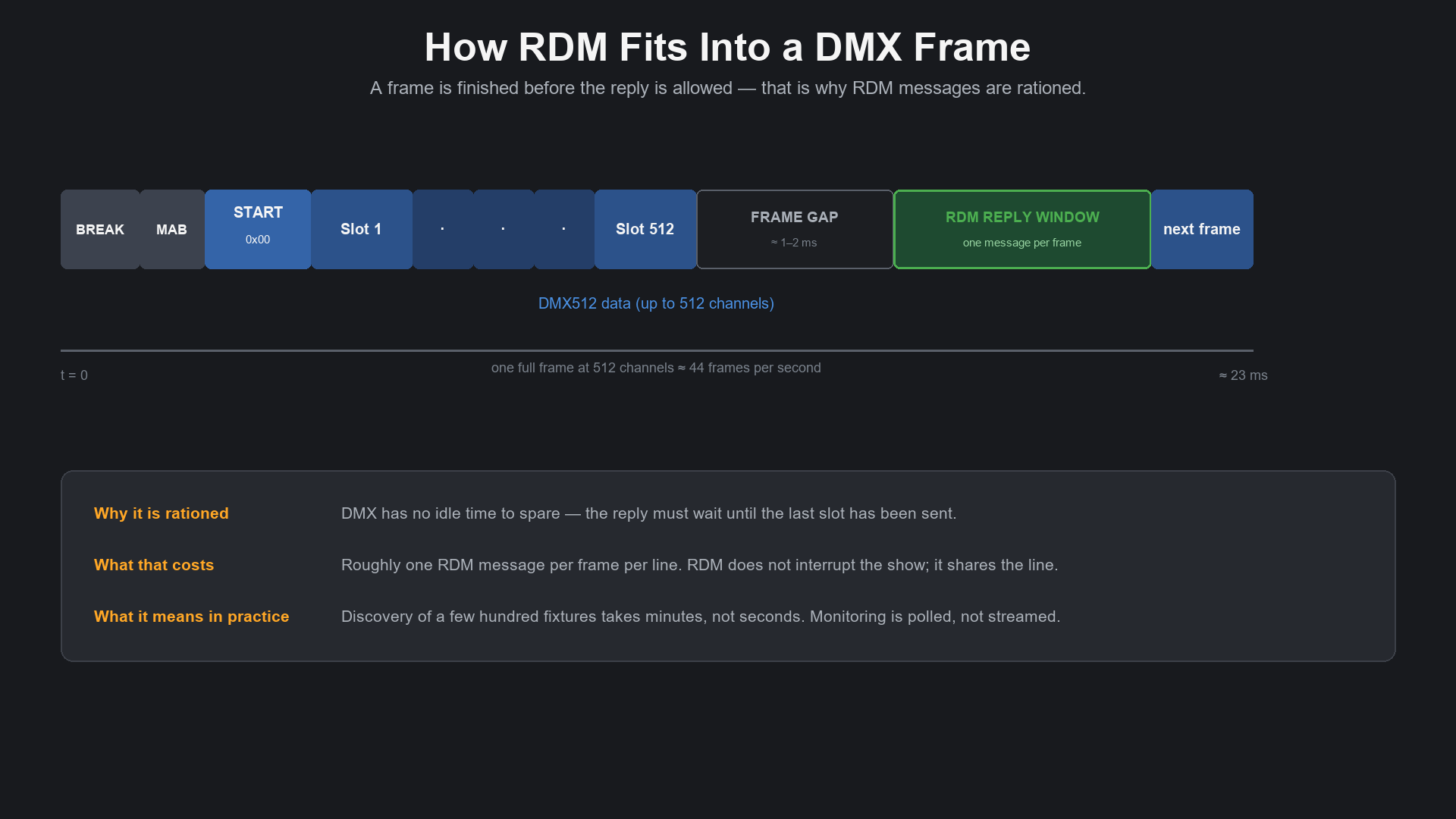
Two consequences follow directly from that design, and both are worth internalising:
- RDM does not interrupt the show. The DMX frames keep going out on schedule. RDM traffic borrows the gaps.
- RDM is slow, deliberately. Roughly one message per frame, per line. You do not stream sensor data. You poll it. A temperature reading updated every few seconds is plenty; a fixture list that takes two minutes to build is still a fixture list.
Who talks, and who listens
RDM defines exactly two roles:
- Controller — the console, laptop or node that initiates everything. RDM is strictly controller-led; a fixture never speaks unless asked.
- Responder — the fixture, dimmer, splitter or node that answers.
Only one controller should be actively running discovery on a line at a time. Two consoles both interrogating the same universe is one of the most common reasons "RDM is not working" — it is working, and the two controllers are talking over each other.
The UID: how a fixture is named
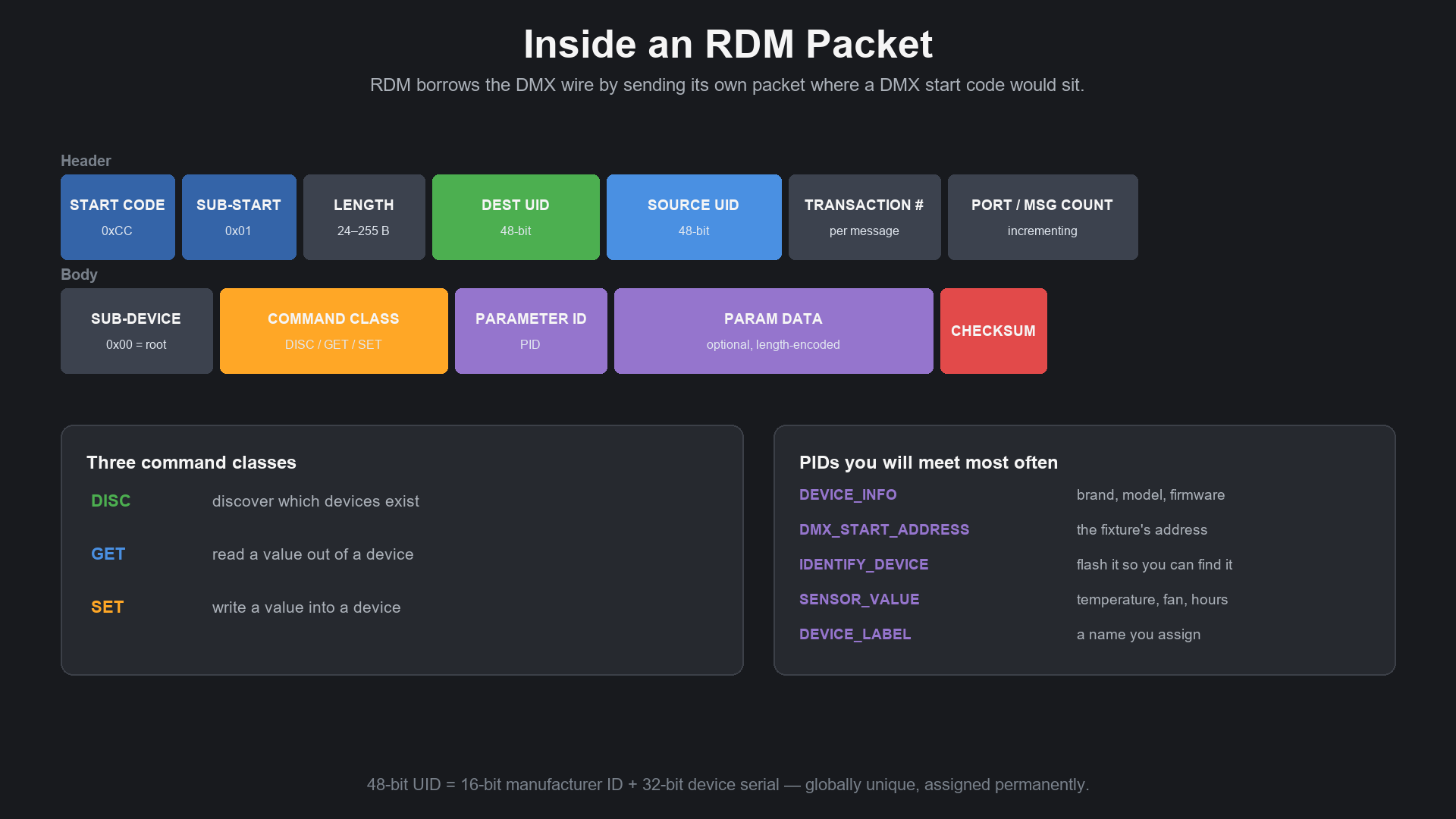
Every RDM device carries a 48-bit UID: a 16-bit manufacturer ID assigned by ESTA, followed by a 32-bit device serial number assigned by the manufacturer. The result is globally unique and permanent. It is not the DMX address — it does not change when you repatch, and two fixtures with the same DMX address still have different UIDs.
That distinction matters: DMX addressing and RDM identity are independent. You can find and manage a fixture whose DMX address is wrong or clashing, which is precisely the situation where remote management earns its keep.
DISC, GET, SET — and the PIDs
Every RDM exchange carries one of three command classes:
| Command class | What it does |
|---|---|
| DISC | Discovery. "Who is out there, and what is your UID?" |
| GET | Read one parameter from a device |
| SET | Write one parameter into a device |
The parameter being read or written is named by a PID (Parameter ID). A small number of PIDs do most of the work in real life:
| PID | What it gives you |
|---|---|
| `DEVICE_INFO` | Manufacturer, model, firmware version, DMX footprint, number of sub-devices |
| `DMX_START_ADDRESS` | The fixture's DMX address — readable and writable |
| `IDENTIFY_DEVICE` | Makes the fixture flash so you can see which one it is |
| `SENSOR_VALUE` | Temperature, fan speed, supply voltage, hours run |
| `DEVICE_LABEL` | A name you assign, such as "DSL-04 stage right" |
| `SUPPORTED_PARAMETERS` | The complete list of what this particular device can do |
That last one deserves attention. RDM support is not a yes/no checkbox — it is a list. Two fixtures from two brands can both be "RDM compatible" and support completely different PID sets. A device that answers `SUPPORTED_PARAMETERS` honestly is telling you exactly what you can and cannot manage remotely. When buying, that list is the specification worth asking for.
4. Discovery: How a Console Finds Every Fixture
Before a controller can ask anything, it has to know who is on the line. That process is discovery, and it is the cleverest part of the standard.
The naive approach — shout "is anybody there?" — fails immediately. If twenty fixtures answer at once, their replies collide into noise. RDM solves this the way a database solves a lookup problem: by halving.
- The controller broadcasts a `DISC_UNIQUE_BRANCH` over the entire UID range, from `000000000000` to `FFFFFFFFFFFF`.
- If devices answer, the controller knows the range is populated — but not with what, because multiple answers collided.
- It splits the range in half and asks again: does anything exist between `0000…` and `7FFF…`? And between `8000…` and `FFFF…`?
- On a branch where exactly one device answers cleanly, that UID is captured. On a branch where several answer, the range is halved again.
- Captured devices are then excluded, and the process repeats until every branch resolves to a single UID.
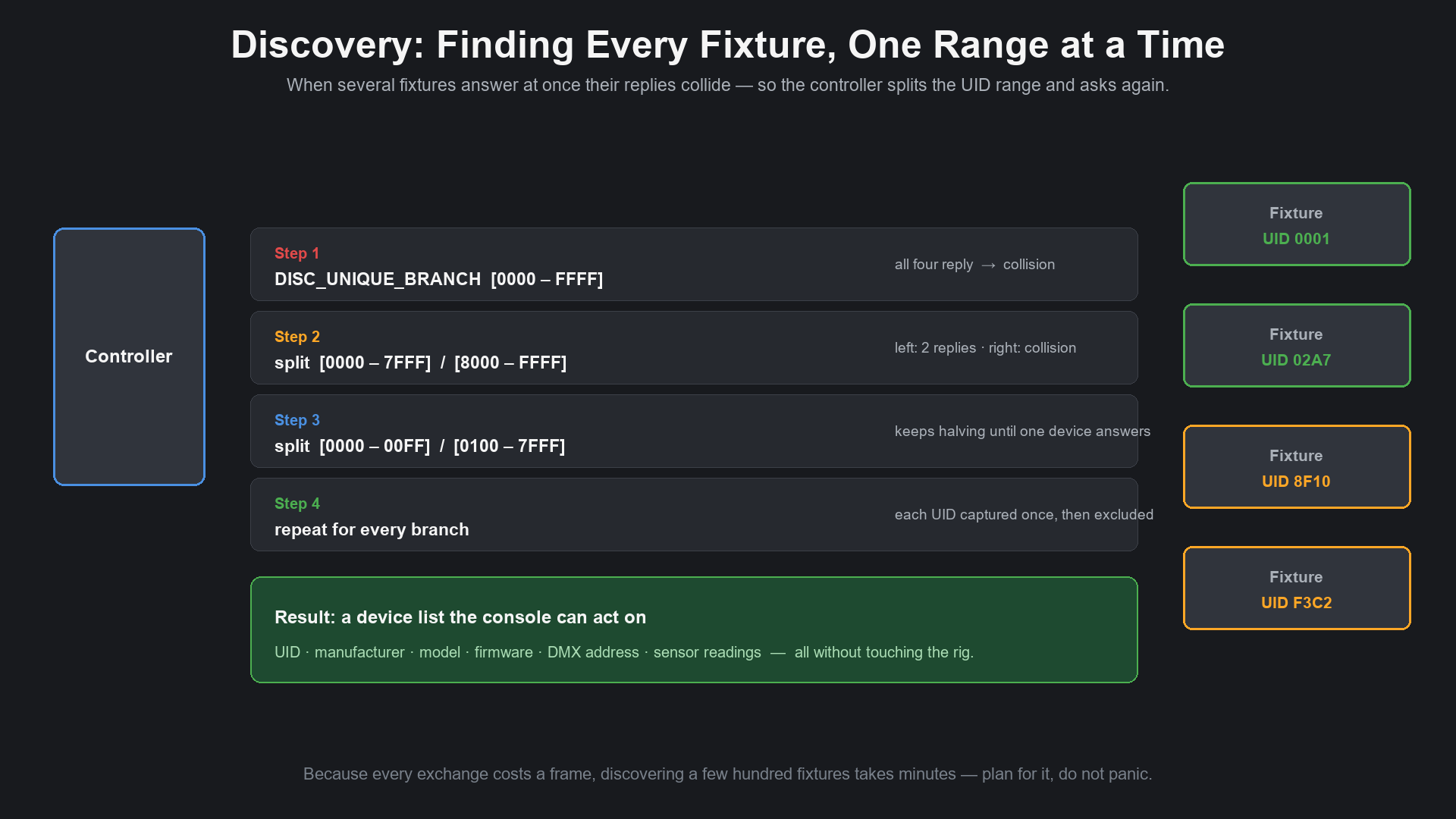
As each device is found, it can be muted (`DISC_MUTE`) so it stops answering and the remaining search gets faster. When discovery finishes, the controller holds a list of every UID present.
Two practical notes:
- Discovery takes time, and that is normal. A handful of fixtures resolves in seconds. Several hundred, spread across multiple lines, takes minutes. This is arithmetic, not a fault.
- Discovery is where most "RDM is broken" cases actually live. If a fixture does not appear, the reason is usually physical — a splitter, a terminator, a cable, or RDM switched off in the fixture menu.
5. What You Can Actually Do With RDM
Everything below is a real capability on RDM-capable equipment. How much of it you get depends on the fixture's PID list.
| Task | How RDM does it | Why it matters |
|---|---|---|
| Change a DMX address remotely | SET `DMX_START_ADDRESS` | No climbing, no menu hunting. Repatching becomes a console task, not a rigging task. |
| Find a specific fixture physically | SET `IDENTIFY_DEVICE` | The fixture flashes. You point at it instead of counting from the end of the truss. |
| Build an inventory | GET `DEVICE_INFO`, `DEVICE_LABEL` | Model, firmware revision and assigned name for every device, exportable. |
| Verify delivered addresses against drawings | GET `DMX_START_ADDRESS` on everything | A commissioning check that takes minutes instead of a site visit. |
| Monitor temperature and cooling | GET `SENSOR_VALUE` | Catch a failing fan or a hot fixture before it shuts down mid-show. |
| Track hours and usage | GET `SENSOR_VALUE` counters | Lamp life, service intervals, warranty discussions with actual numbers. |
| Set dimmer and response curves | SET manufacturer PIDs | Match fixtures across a mixed rig so they fade identically. |
| Adjust PWM frequency for camera work | SET manufacturer PIDs | The fix for banding and flicker on broadcast and film shoots. |
| Switch operating modes | SET manufacturer PIDs | Change a fixture between beam, spot and wash behaviour, or between DMX and standalone. |
| Update firmware | Some devices, via RDM or manufacturer tools | Rolling a fix across a rig without physically touching every unit. |
Two honest caveats. Manufacturer-specific settings live in manufacturer-specific PIDs, so cross-brand remote configuration is limited to the standard parameter set — the standard defines the vocabulary, not every sentence in it. And RDM is not a substitute for good documentation. It tells you what is on the line right now; it does not tell you what the drawing says or why the designer chose that address.
6. RDM, DMX, Art-Net, sACN and RDMnet: How They Fit Together
These names get used interchangeably in conversation and they should not be. Here is the actual map:
| Standard | Common name | What it carries | Device management? |
|---|---|---|---|
| ANSI E1.11 | DMX512-A | 512 control channels down one cable, one direction | No |
| ANSI E1.20 | RDM | RDM messages, sharing the DMX pair | Yes — but only along the DMX line |
| ANSI E1.31 | sACN | DMX512 data over Ethernet, multicast | No |
| ANSI E1.33 | RDMnet | RDM messages over Ethernet/IP | Yes — across the network |
| Art-Net | Art-Net 4 | DMX512 and RDM over Ethernet, UDP | Partly — RDM transport is defined |
The important relationships:
- DMX is the foundation. RDM does not function without a DMX512-A physical layer to sit on.
- sACN and Art-Net are transport. They move DMX data around a network. They say nothing about managing the devices at the far end.
- RDMnet (E1.33) is the missing piece for IP-based rigs. It takes the same RDM messages and transports them across Ethernet, so a console can discover and configure fixtures on the network rather than only on the cable run physically attached to it. It also defines how gateways between IP and DMX should behave, so a device on a DMX line behind a node is still reachable.
- Art-Net can carry RDM, and many nodes support that. Support is not universal, and it is another line item to verify rather than assume.
In a modern rig you will often see all of it at once: sACN or Art-Net from the console to the nodes, DMX from the nodes to the fixtures, and RDMnet or RDM-over-Art-Net handling device management across the whole system.
7. Where RDM Breaks in Real Rigs
RDM is a two-way signal, and that means everything in the path has to be able to pass signal in both directions. This is where most real-world failures come from.
Splitters and opto-isolators that only go one way. This is the single most common cause of a fixture not appearing in discovery. Many older DMX splitters, isolators and mergers are unidirectional by design — they amplify and repeat data downstream and simply cannot carry a reply back upstream. RDM-capable splitters either pass RDM on every port or, better, let you switch RDM off per port so you can segregate legacy lines.
Mixing RDM and non-RDM equipment on one line. Not every device tolerates RDM traffic politely. The clean approach is to keep RDM lines pure: if a splitter supports per-port RDM, put the legacy fixtures behind a port where RDM is disabled.
Cable quality, termination and topology. RDM is sent in the gaps and is therefore subject to the same physics as DMX — reflections, stubs, wrong cable and missing termination all degrade it. Termination at 120 Ω at the end of the line matters more, not less, when you are relying on clean two-way communication.
Wireless DMX links. Most wireless systems carry control in one direction only. Some support RDM, most do not, and those that do sometimes carry discovery but struggle with sustained monitoring. If your rig is wireless, assume RDM stops at the transmitter unless the datasheet says otherwise.
Mixed brands and non-standard PIDs. "Supports RDM" in a brochure does not mean "supports the parameter you wanted." Manufacturer-specific PIDs sit in a reserved range, so cross-brand remote configuration is bounded by the standard set. Fixtures that report `SUPPORTED_PARAMETERS` accurately make this manageable; those that do not make it guesswork.
Two controllers discovering at once. A console and a laptop tool both running discovery on the same universe will interfere with each other and produce a confusing partial list. Run one at a time.
Expectations about speed. RDM does not make a rig instant. It makes a rig visible.
8. What to Check Before You Buy
If remote management matters to your projects, these questions separate real support from a marketing line:
- Does the fixture support RDM at all? On the BMS range, the majority of models do — but it should be confirmed per model, not assumed.
- Which PIDs are supported? Ask for the `SUPPORTED_PARAMETERS` list, or connect a fixture and read it. This is the honest specification.
- Is the address remotely writable, or only readable? Reading a DMX address without being able to set it is still useful — but it is half the benefit.
- Is `IDENTIFY_DEVICE` implemented? A small feature that saves a great deal of time on a tall rig.
- Does it report sensor data? Temperature and fan speed are the two readings most likely to prevent a mid-show failure.
- Are PWM frequency or dimmer curves adjustable over RDM? Essential if the rig will ever be filmed.
- Will it report firmware version? So you can spot the odd unit out before it behaves differently from its neighbours.
- Does your control side support RDM? Consoles, nodes and diagnostic software vary widely. The fixture is only half the conversation.
- Does your splitter pass RDM? No amount of fixture capability survives a one-way splitter.
- Is there a documented way to switch RDM off? There are situations — legacy lines, troubleshooting, unusual rigs — where you want it disabled deliberately.
Note that RDM support costs the manufacturer real engineering effort: a bidirectional driver, a compliant discovery state machine, an accurate PID set. A datasheet that lists RDM without listing a PID set is worth a follow-up question.
9. RDM Not Working? A Five-Minute Checklist
The industry-standard debugging method is to simplify until it works, then add complexity back. Do it in this order.
Step 1 — One console, one fixture, one cable.
Connect a single RDM-capable fixture directly to the console output. No splitter, no isolator, no wireless, no long run. Run discovery. If the fixture appears, the fixture and console are fine and the problem is downstream. If it does not appear, check the fixture's menu: many fixtures ship with RDM disabled, or on a disabled port.
Step 2 — Add the termination.
Put a 120 Ω terminator on the last fixture. Odd behaviour on short cables with one fixture is often exactly this. Re-run discovery.
Step 3 — Add the splitter back.
Now insert the splitter and try again. If discovery collapses at this point, you have found the fault. Check whether the splitter is RDM-capable, whether RDM is enabled per port, and whether all fixtures are on the same output.
Step 4 — Add the run length back.
Reconnect the real cable run. Failures here point to cable, topology, stub length or interference rather than equipment.
Step 5 — Add the remaining lines and devices.
Repeat per line. When something breaks, you know exactly which addition caused it.
Through all of it, remember two things: only one controller should be discovering at a time, and discovery taking minutes is not a fault — on a busy rig, it is the expected result.
10. Frequently Asked Questions
Does RDM slow down my DMX?
In normal use, no. RDM messages occupy the frame gaps, and the DMX frames continue at their standard rate. The exception is a controller that polls aggressively — a long discovery sweep or a constantly refreshed sensor poll can consume the available slots, and in extreme cases the DMX refresh rate will dip. Sensible polling intervals avoid this entirely.
Can I run RDM on the same cable as DMX?
That is what RDM is designed for. The control data and the management traffic share the same pair of wires.
Do I need special cable?
No. Standard DMX512 cable is what RDM runs on. What you do need is correct termination and a clean topology, because two-way communication is less forgiving of a sloppy line than one-way.
Will RDM work if my splitter is not RDM-capable?
No. A unidirectional splitter blocks the reply. This is the most common single point of failure in real installations.
Can RDM work over wireless DMX?
Sometimes. Some wireless systems transport RDM, many do not. Treat it as a feature to verify, not a given.
Can I mix brands on one RDM line?
Yes, for standard parameters. Discovery, addressing, identification and sensor readings are defined by the standard, so they work across brands. Brand-specific settings are not portable.
Is RDM the same as RDMnet?
No. RDM is ANSI E1.20 and runs on the DMX line. RDMnet is ANSI E1.33 and carries the same messages across an IP network.
Can I update firmware over RDM?
On some devices, yes — and some manufacturers provide their own RDM-based tools for exactly that. It depends entirely on the fixture, and it is worth asking specifically.
Do I have to use RDM if my fixtures support it?
No. It can usually be switched off in the fixture menu, on the console, and per port on a good splitter. Plenty of rigs run happily with DMX alone.
What happens if two fixtures have the same DMX address?
RDM can still see both of them, because they have different UIDs. That is exactly the situation where remote management is most useful: the fixtures are behaving badly on stage, and you can fix them from the console without knowing which physical head is which.
11. The Short Version
- RDM (ANSI E1.20) adds two-way communication to DMX512, on the cable you already have.
- It lets a console find, identify, address, configure and monitor fixtures remotely — instead of climbing to each one.
- The trade-off is speed: replies fit in the frame gap, so roughly one message per frame, per line. Discovery takes minutes on a large rig.
- Everything in the path must pass signal both ways. A one-way splitter is the number one reason RDM "does not work."
- Support is a list of parameters, not a checkbox. Ask for the `SUPPORTED_PARAMETERS` set when specifying.
- RDMnet (ANSI E1.33) carries the same idea across Ethernet for network-based rigs.
- RDM does not make a rig faster to build. It makes it faster to verify, correct and maintain — which is where the hours actually go.
Specifying a rig that has to be managed remotely? Send us the fixture list, the console and the control topology you are planning — we will confirm which models support RDM, which parameters are readable and writable, and how the signal path should be built so that discovery actually works on site.